JAMSESH Buy early access — €10

Early access is open

The studio you play together.

Record a song, loop what you just played, hum a tune into any instrument, beatbox into drums, mix on DJ decks. Then send a link and jam with friends. One app for Windows.

  • One-time purchase
  • No account
  • Works offline

Windows 10 and 11, 64-bit. Your price stays yours, with every 1.x update.

Hear JamSesh

Jam

Made in JamSesh

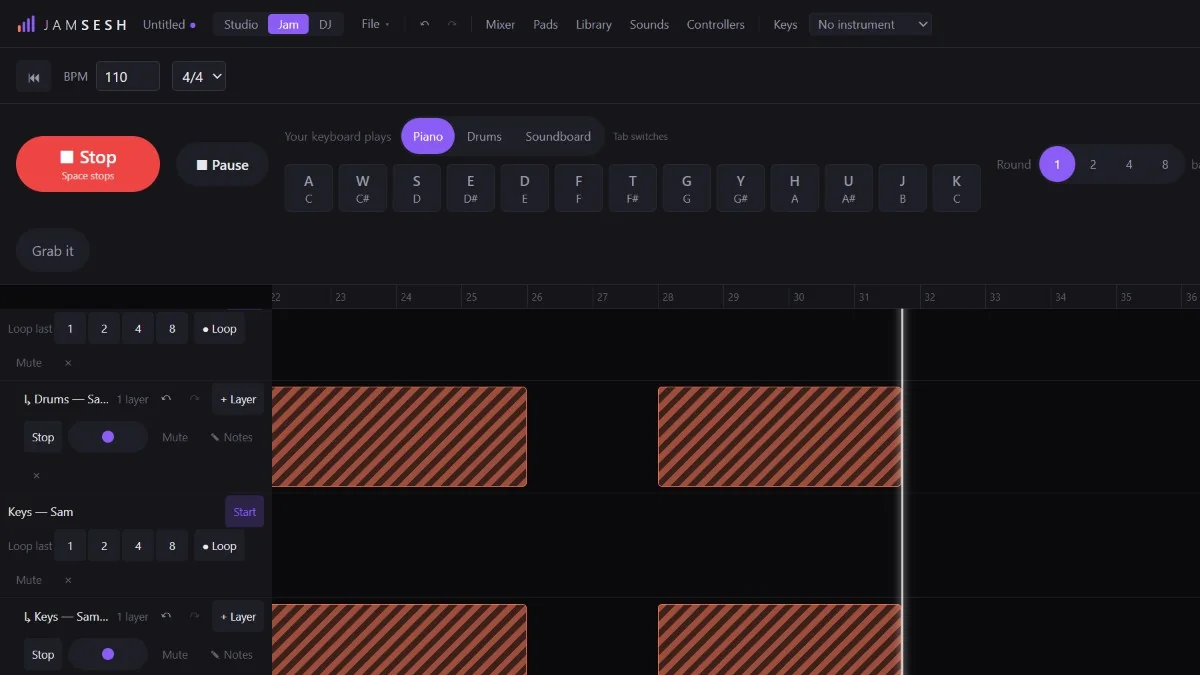
The Jam view in JamSesh while a jam records: Sam's drum and keys loops and Jay's bass loop repeat under the tracks they came from, while Jay's lead is being recorded

Three ways to play, one app

Switch between them with one click. A jam can become a song in the Studio; the DJ decks play your library.

Studio

Arrange a song on the timeline. Record your voice or guitar, write parts in the piano roll, or play a melody in while the clip loops round.

  • Piano roll that keeps you in key, drum grid for beats
  • Polish cleans up a take: noise, hum and levels in one go
  • Effects, amps and cabinets; export WAV or a DAWproject
How the Studio works

Jam

Press Jam and play. Everything you start is recorded while the music keeps going. Liked the last bars? Loop them, and they come back on the next round.

  • Loop the last 1, 2, 4 or 8 bars, or hold to record a loop
  • Mic and guitar loops too, layer on layer
  • Star a moment, keep it as a file, or send it to the Studio

How a jam works

DJ

Two decks, or four in Advanced mode, with sync, hot cues, beat loops, three-band EQ and a filter. JamSesh finds the tempo and key of your whole music library.

  • Key lock, jog wheel scratching, headphone cue
  • Search your library by name, key or BPM
  • Map a DJ controller with the wizard (experimental)

How the decks work

Your voice is an instrument

Hum, sing or whistle and a violin, a bass or a synth follows you, pulled into the song's key. Beatbox and real drums play the moment you make the sound.

  • Range: where the instrument sounds best, your own pitch, or up to four octaves lower or higher
  • Teach your own sounds: make a sound five times and it plays the drum you pick
  • One microphone for both: hits play drums, held tones play the instrument

Recognition works best with a clear microphone. On cheap headsets it misses more notes, so voice playing is still experimental.

Play with your voice

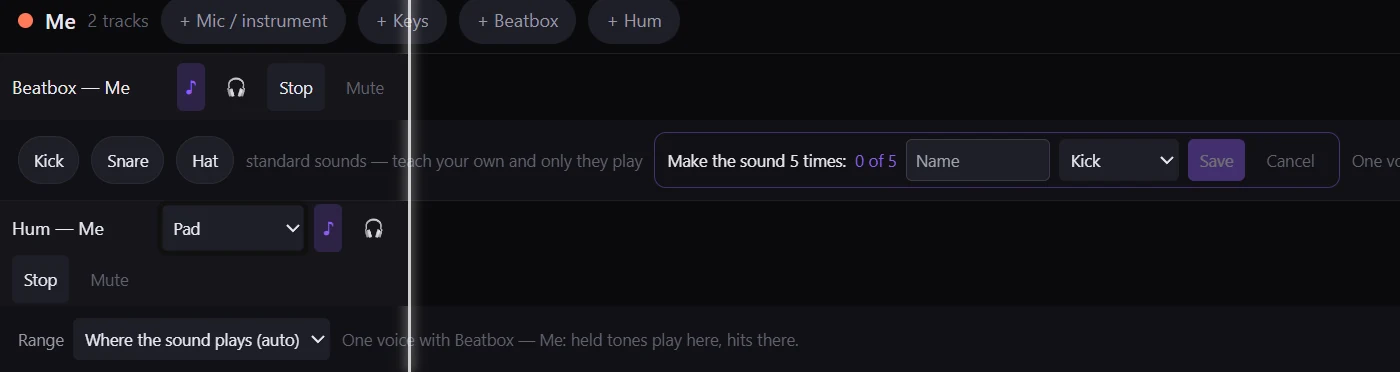
A Beatbox lane and a Hum lane for one player in the Jam view. The Beatbox lane is learning a new sound: Make the sound 5 times, 0 of 5, played on the Kick. The Hum lane plays a Pad, and its Range is set to Where the sound plays (auto)
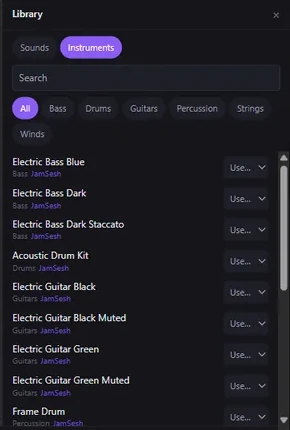
The library's Instruments tab: Electric Bass Blue, Electric Bass Dark, Acoustic Drum Kit, Electric Guitar Black and more, each from JamSesh
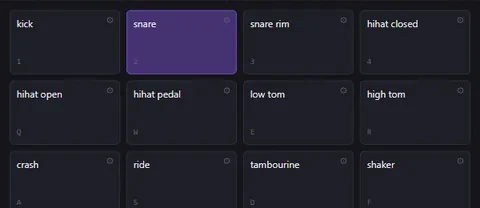
The pads with the Acoustic Drum Kit on them, one piece per pad: kick, snare, snare rim, hihats, toms, crash, ride, tambourine and shaker

A library in the box, pads to play it

JamSesh comes with sampled instruments: guitars, basses, a drum kit, violin, cello, flute, harp and more, all free to use in your music (CC0). They work offline from the first start.

  • Drag a drum kit onto the pads and its kick, snare, hats, toms and cymbals land a pad each
  • Drag an instrument onto a pad, a track or the keys and it plays there
  • Play pads with the mouse, your computer keys or a MIDI controller

Your library and your own sounds

Experimental

Jam together, from anywhere

Host a session from your own computer and send your friends a link. Everyone hears each other, edits the same song and records into it. No account and no server in between.

  • Same room or home network: friends see your session and join
  • Across the internet: JamSesh asks your router to open the way (UPnP). If the router refuses, it shows the steps to do it by hand
  • Private: only people with your link get in

Host and join a session

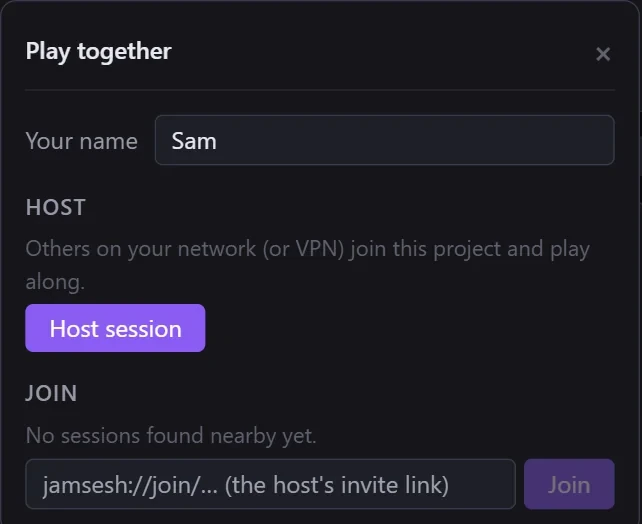
The Play together panel: your name, Host session, and Join with the host's invite link

Plug in what you have

Mics and audio interfaces
Several inputs at once, through Windows audio (WASAPI)
Guitar and bass
Amps, cabinets, wah, chorus, a tuner, ready-made chains
MIDI keyboards
Including MPE; two keyboards can play two tracks
Your computer keyboard
Plays piano, drums or the pads, no gear needed
Plugins experimental
VST3 and CLAP, each in its own process
DJ controllers experimental
Taught with the mapping wizard
Kids mode
Big pads, loop buttons and a capped volume
Not in the beta
ASIO drivers, Ableton Link, Mac

How does it all work? The guides walk through every view, step by step. What is finished and what is experimental: beta status.

Experimental

Experimental: build together with AI agents

Switch on JamSesh's built-in MCP connection and an AI assistant such as Claude can work in your project: write parts, balance the mix, listen to its own result and answer the notes you leave on the timeline. Every change is one undo step, and it only happens when you allow it.

Bring your own AI assistant: you use it with your own account and plan at its provider. JamSesh provides no AI service and sees nothing of it — see the Content & AI policy.

How agents work in JamSesh

Pay once. Keep it.

No subscription and no account. Try everything for 14 days. After that, saving and exporting need a purchase code; nothing you made is lost.

Early buyers pay less. The price goes up as more people buy, and what you pay stays yours, with every 1.x update.

  1. €10 First 5,000 buyers Now
  2. €20 Up to 10,000
  3. €49 Official price

Make it with us

JamSesh is growing every week, shaped by the people who play it. Join the Discord to get help, report a bug, share an idea, find tutorials and show what you made.

Join the JamSesh Discord

Something broke? In JamSesh choose Help → Report a problem…: it saves a diagnostics file and opens a mail to support@getjamsesh.com. Updates arrive inside the app and never interrupt a take.

Questions

What do I get after the 14 days?

Everything keeps working except saving and exporting. Buy early access and you get a purchase code by mail; press Activate in that mail (or paste the code under Help → Unlock JamSesh) and it is unlocked for good. Nothing you made is lost.

Does it work on Mac or my phone?

Not yet. JamSesh is for Windows 10 and 11, 64-bit. Mac is on the roadmap.

Do I need an internet connection or an account?

No. Everything runs on your computer and there is no account. You only need the internet to download, to get updates and to jam with people outside your home network.

Will my audio interface and controller work?

Most USB audio interfaces, microphones and MIDI keyboards work through Windows audio (WASAPI). ASIO drivers are not in the beta yet. DJ controllers and other MIDI devices are experimental: many work through the mapping wizard, but we have not tried every model.

Windows says it protected my PC. Is that right?

JamSesh is from a new publisher, so Windows SmartScreen warns. Click More info, then Run anyway. The installer needs no administrator rights.

How does jamming over the internet work?

One person hosts from their own computer and sends a link. JamSesh asks the router to open the way (UPnP); if it can't, it shows the steps. On a home network it just works. Over the internet it is experimental, because it depends on the host's router.

How do updates work?

JamSesh checks for updates and asks before it installs one. It never installs in the middle of a take or a jam: it waits until the music stops.

More answers in the FAQ.

Start a session tonight

About 470 MB, the instrument library included. Free for 14 days.